Job Description Best Practices
Optimize your new and existing job descriptions to reach more candidates
Get the Guide
Quick Answer
A strong Indeed job post clearly explains the role, pay and location so qualified candidates can decide quickly whether to apply.
TL;DR:
- Gather the details job seekers care about most, including job title, responsibilities, pay, location, job type and benefits.
- Write the post in plain language on Indeed, then use Screener Questions to filter for must-have requirements.
- Sponsor the job on Indeed when you need more visibility, faster hiring speed or stronger reach for hard-to-fill roles.
Key Terms:
- Screener Questions: Screening questions in an Indeed job post that help employers identify candidates who meet required criteria.
- Sponsored Jobs: Paid Indeed job posts that increase visibility in relevant search results and can help attract applicants faster.
- Premium Sponsored Jobs: A higher-visibility Sponsored Jobs option with added features such as stronger targeting, proactive matching and branding tools.
- Employer Dashboard: Indeed’s workspace for managing job posts, reviewing applicants, adjusting budgets and contacting support.
- Job description: The section of a job post that explains the role’s responsibilities, requirements, pay, benefits and other key details.
What makes a job post effective on Indeed?
A job post is often a job seeker’s first real look at your company, so it needs to work for them as much as it works for you. This guide is based on what job seekers tell us they look for on Indeed today: clear information, realistic expectations and enough detail to decide quickly whether to apply. As you read, keep coming back to one simple question: “Would a job seeker find this helpful right now?”
Sometimes you might see one of your jobs on Indeed even if you did not post it directly. That can happen when Indeed aggregates listings from your career site or other job boards. Posting directly on Indeed is still recommended, because it gives you more control over the content, lets you use Indeeds hiring tools and helps candidates have a smoother, more consistent experience with your job post.
What information should you gather before posting a job?
Indeed’s step-by-step job post process makes posting jobs easier. To make the most of it, gather some info ahead of time.
Here’s what job seekers say are must-haves if you want them to apply:
- A clear job title
- Day-to-day responsibilities
- Qualifications (degrees, certificates, software knowledge, etc.)
- Exact location including street address (or remote)
- Job type (full-time, part-time, etc.)
- Pay range (hourly or salary)
- Benefits (health, dental, etc.)
The above info covers the majority of the questions any job seeker is going to have about the position. And with this info, you can spend less time filling out your job post and more time connecting with great candidates.
How can employers widen their candidate search without lowering standards?
For some jobs, hard skills and certifications are a must to consider a candidate. For others, you might want to prioritize ability and cultural fit. Why? Many of the employers we’ve talked to have stated that their best hires were somewhat unconventional.
It’s about potential. Some candidates might have the right attitude and the drive to be a powerful asset to your team, even if their resume isn’t packed with the exact experience you’re looking for. Below are some characteristics that many employers tell us they look for:
- Integrity
- Ability to communicate effectively
- Willingness to learn
- Independence
- Ambition
- Adaptability
Don’t be afraid to mention some of these traits in your job description. That way, job seekers can see whether or not the role—and the company culture—is a good fit before they apply.
How should employers separate required qualifications from preferred qualifications?
Your job description describes the ideal candidate, but there’s a difference between crucial hard skills and preferred (but still important) soft skills. The difference? You can’t consider someone for a Nursing job if they don’t even have a Nursing degree.
For the sake of your job seekers, always put the need-to-have requirements at the top of your post. They’ll be thankful to see whether they’re qualified or not right off the bat. It’s also important to clearly label which qualifications are required and which are preferred.
If you’re not sure, a quick conversation with a colleague can help you get on the same page.
When should employers sponsor a job post on Indeed?
Any time you post a job on Indeed, you’ll decide whether to leave it as a free post or pay to sponsor it. Sponsoring gives your job more visibility in relevant search results and unlocks additional tools designed to help you reach and engage qualified candidates faster, so it helps to know up front whether you have budget for that role.
If you start with a free post and later realize you need more traction or speed, you can return to the job in your Employer Dashboard at any time and add a sponsorship budget without creating a new posting.
How should employers write a job post on Indeed?
When you start a job post, Indeed breaks it down step-by-step so you don’t miss any crucial info that job seekers are looking for. Make sure to answer as many prompts as you can so we can help connect you with the right candidates.
What are best practices for writing a job post that candidates will read?
When you write in a way that’s easy to read, you’re more likely to have your post read from start to finish. Some job seekers might close out of a poorly formatted post even if they could be a good fit. And you definitely don’t want a talented job seeker to be left with a less-than-ideal impression of your company.
Above all else, following these best practices will help you attract the kind of quality candidates you want to hire, even if they’re just scanning your post.
Here are a few best practices:
- Avoid big blocks of text – break it up into smaller 3-4 sentence paragraphs
- Use an accessible vocabulary anyone can understand
- Use lists (bullet points) to make info easy to scan
- Write in an upbeat, conversational tone
- Add sections (qualifications, benefits, etc.) for scannability
Which job details matter most to candidates on Indeed?
Once you start receiving prompts for job details, try not to skip any of the form fields Indeed provides. Pay range is the very first thing candidates look for in a job post–don’t skip it! Luckily, Indeed makes it easier by giving you salary recommendations based on average market data for the job title and location.
Location is also a very important detail that you should include. Did you know that commute time is the #2 reason candidates withdraw from an application.[1] Even if you’re working remotely right now, including your company’s location is a must if you expect a new hire to work on-site in the future.
The more info you provide the better. All that info is used to show quality candidates your job post in the search results. And don’t worry, all the job post info you type out is saved for next time. So the next time you post a job, you can save time by selecting a previous job post as a starting point.
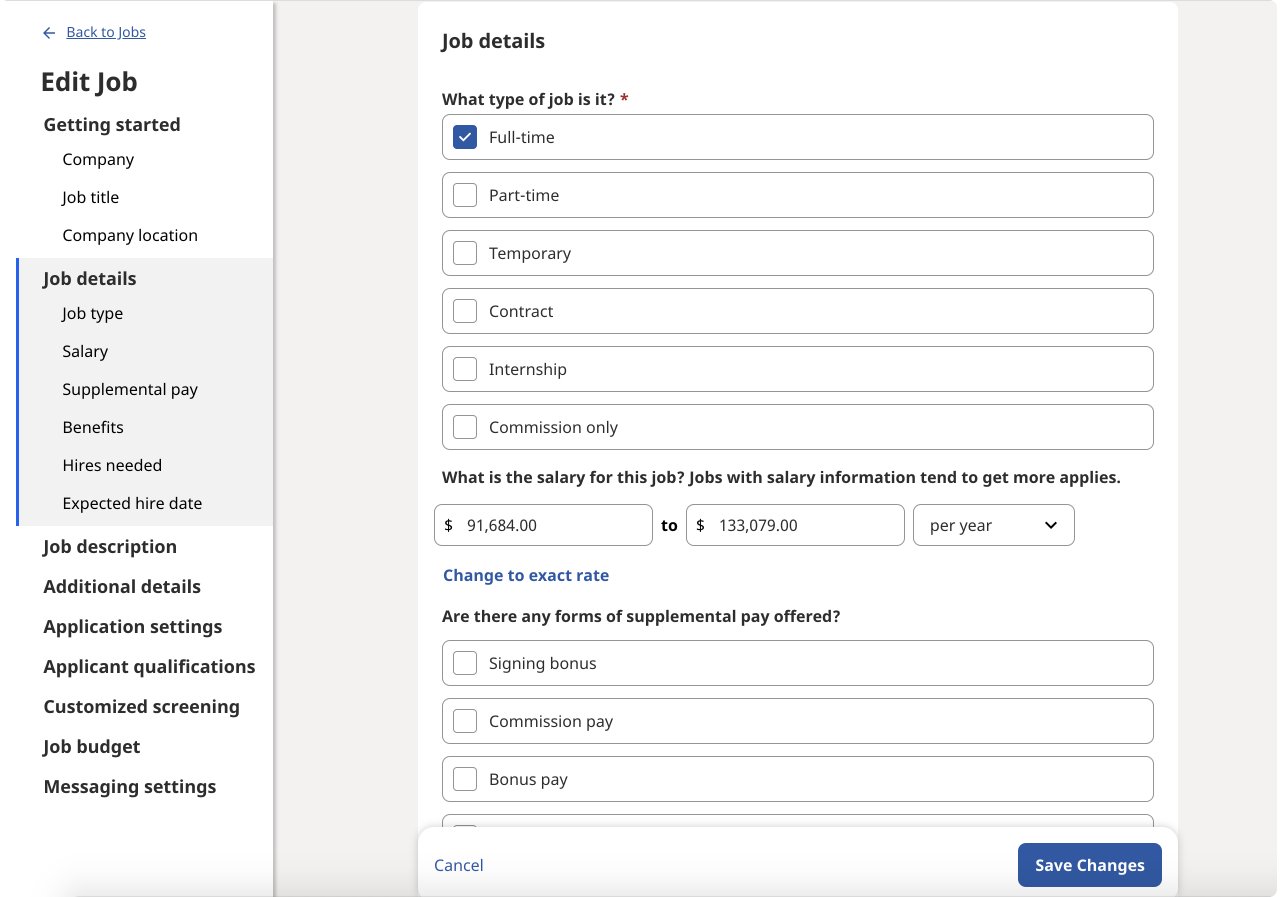
Not-so-little details that job seekers want to see.
How do you write a strong job description on Indeed?
Your job description is where you list qualifications, skills, benefits, and anything else that’s relevant to the job. Indeed breaks it down one area at a time so it never feels like too much.
A great job description includes 4 main sections: Introduction, Responsibilities, Requirements, and Benefits. If possible, try to add some of the need-to-have requirements in your intro so job seekers can immediately decide whether or not they’re qualified.
Which Indeed tools help employers find the right candidates?
Indeed has a number of tools to help you attract and find qualified applicants. When you use Screener Questions, you’ll save time finding great candidates to interview.
How do Screener Questions help filter candidates on Indeed?
To quickly find your best applicants, make sure to ask some Screener Questions in your job post. You can ask questions about applicants’ qualifications and, later on, filter by these questions in your Employer Dashboard.
Indeed provides a number of pre-made questions to choose from, but you can also customize Screener Questions to fit your needs. That way, you can immediately see whether or not to consider an applicant for the job.
You can choose to auto reject applicants who answer “no” to certain questions. Although it may seem harsh, people prefer to know where they stand with a potential employer. And Indeed creates polite, personalized emails on your behalf to soften the blow.

Here are some of the pre-made Screener Questions you can choose from.
How does sponsoring a job help employers hire faster on Indeed?
Believe it or not, we understand that simply posting a job is sometimes the way to go in certain hiring situations. But if you want to hire fast or are hiring for a hard-to-fill position, paying to post your job will give your job better visibility in relevant search results. That means your job post will appear more often to the kind of candidates you’re looking for.
What’s the difference between free and Sponsored Jobs on Indeed?
To post a job for free* or to sponsor? That’s the question.
- How fast do you need to hire? If you’re trying to make a hire ASAP, Sponsored Jobs can help you receive more applicants in less time. You can also use the Urgently Hiring label with Premium Sponsored Jobs to show job seekers you’re actively recruiting.
- How specialized is the role? If you’re trying to hire someone for a hard-to-fill position (e.g. nurses, engineers, and tax professionals) Premium Sponsored Jobs can provide added visibility from candidates that meet one or more of the occupational criteria for the role.
- Where are you located? If you live in a place where there just is not a large pool of qualified candidates in your industry, Standard Sponsored Jobs can increase the number of applications you receive through added visibility.
- Are you having a hard time hiring? As a general best practice, if you have a good job description and title but are still having trouble hiring, sponsoring can help. You may be hiring in a competitive market or have a hard-to-fill job.
Standard Sponsored Jobs
- Better job post visibility: Sponsored Jobs have more staying power in search results than non-sponsored jobs so they’re seen by active job seekers. That means you’re more likely to reach the applicants you’re looking for. Sponsored Jobs posted directly on Indeed with a Standard plan at the recommended budget have 6.5X more applications than non-sponsored jobs.[2]
- Reach more candidates: Indeed will include your job in email notifications sent to relevant job seekers in our database actively placing your job in front of the right talent for your role.
- Create a positive candidate experience: Indeed can send automated messages to engage top candidates on your behalf at key moments of the hiring process, like when they apply to your job, are added to your candidate list or you reject an application from the Employer Dashboard.
- Pay for performance: You’ll receive applications at the right pace for your hiring needs, using market insights to set a competitive budget and you can start and stop sponsoring your job posts at any time.
Premium Sponsored Jobs
- Advanced targeting: Indeed will show your job post to active job seekers in search results, who meet your criteria like skills, certifications, licenses, degrees and location. You can also amplify the reach of your Sponsored Job from Indeed to existing audiences on specialized industry sites to reach skilled candidates. In fact, employers who use Sponsored Jobs posted directly on Indeed with a Premium plan move forward with 3.2X more applicants compared to non-sponsored jobs.[3]
- Proactive matching: Immediately view candidates whose resumes on Indeed fit your job description and invite them to apply.
- Quick, efficient, memorable connections: With Premium Sponsored jobs your role is prioritized over similar job posts and you have the option to add attention-grabbing visuals, like company logos and images, and the Urgently Hiring label to help your job stand out.
Sponsored Jobs posted directly on Indeed with Urgently Hiring make a hire 5 days faster than non-sponsored jobs.[4] We’ll also show you candidate highlights to shorten your review time and provide you with auto-generated messages to contact applicants.
How does billing work for Sponsored Jobs on Indeed?
You can pause, close, or remove your budget at any time. Just click Edit Job in the Employer Dashboard. From there, you have the ability to change your budget, pause your job, or close it. We know that hiring needs can quickly change, which is why Indeed gives you complete control of your spend.
How can employers contact Indeed for help with job posting?
Need more help preparing and posting your job? Our Customer Success team optimizes jobs on Indeed every day. Contact Indeed directly from within your Employer Dashboard.
To contact Indeed directly:
- Login to your Indeed account
- Click your profile in the upper navigation bar
- Select Help in the navigation bar and then select Contact us for the option to chat, call or send a message
Note: Indeed will never contact you about your employer account through apps like WhatsApp or ask for sensitive details over informal channels. If you get a call or message that does not seem legitimate, avoid sharing any information, block the sender and report the number to your phone provider.
Back to Hiring with Indeed
*Indeed provides this information as a courtesy to users of this site. Please note that we are not your recruiting or legal advisor, we are not responsible for the content of your job descriptions, and none of the information provided herein guarantees performance.
This article is based on product information available at the time of writing, which may change at any time. Indeed does not guarantee that this information is always up-to-date. Please seek out your CS/Sales rep for the latest on this topic.



